Before running QC
Confirm the source file, event count and channels. Review the compensation state separately. Before population statistics, resolve both acquisition-quality concerns and the fluorescence-processing history; one check cannot substitute for the other.
The original flowAI package checks rate, signal consistency and measurement-range behavior. PeacoQC tracks channel-density peaks across acquisition bins and uses isolation-tree and MAD-based checks. See the official flowAI description and PeacoQC paper.
FlowApp runs its own JavaScript implementations of these workflows in a worker. It is not executing the original R packages in your browser. Method names, screenshots and the demo below do not establish numerical equivalence across versions or validated assay performance. flowAI is a QC algorithm, not an LLM request.
- Open QC from the sample toolbar or the workflow. Choose Select samples or Select group.
- Check the scope and the method checkboxes. With Select samples, the current sample is a starting selection, not an instruction to analyze every file.
- Run QC. For a new dataset, inspect one representative sample before submitting a larger batch.
- Open the QC report or sample detail, inspect each method and record the mark decision before building a report.
The current launcher selects methods; it does not expose a complete editor for algorithm thresholds. Do not describe a method checkbox as a custom laboratory QC threshold.
What the results do and do not mean
| Result | Meaning in this workflow | Do not conclude |
|---|---|---|
| QC not run / pending | No result is available for the selected method and sample. | That the sample passed or failed. |
| flowAI anomaly percentage | The fraction marked by the implemented flowAI stages. | The fraction of dead cells, debris or contaminated cells. |
| peacoQC marked percentage | The fraction assigned to marked acquisition bins by that method. | An extra percentage to add to flowAI; the same events may be implicated. |
| Pass / Review / Fail | FlowApp's summary of the computed flags. | A clinical decision or a laboratory acceptance limit. |
| Completed | The computation finished and produced a result. | That a researcher has reviewed it or excluded events. |
Inspect the reported rate bins, signal changes, range flags and marked regions. Different methods can flag different patterns. Neither matching percentages nor a green summary validates the input settings or the biological interpretation.
Preview, accept and reject are review decisions
In the sample detail, Preview peacoQC records a preview state. Accept marks records that the marks were accepted for reporting; Reject marks keeps the run as audit context. These actions do not automatically delete events or recalculate gates on a cleaned event set.
A reported GoodEvents count is the complement of that method's marks, not proof that the plotted file has been physically filtered. The existing event count and population statistics must not be interpreted as post-cleaning values merely because you clicked Accept.
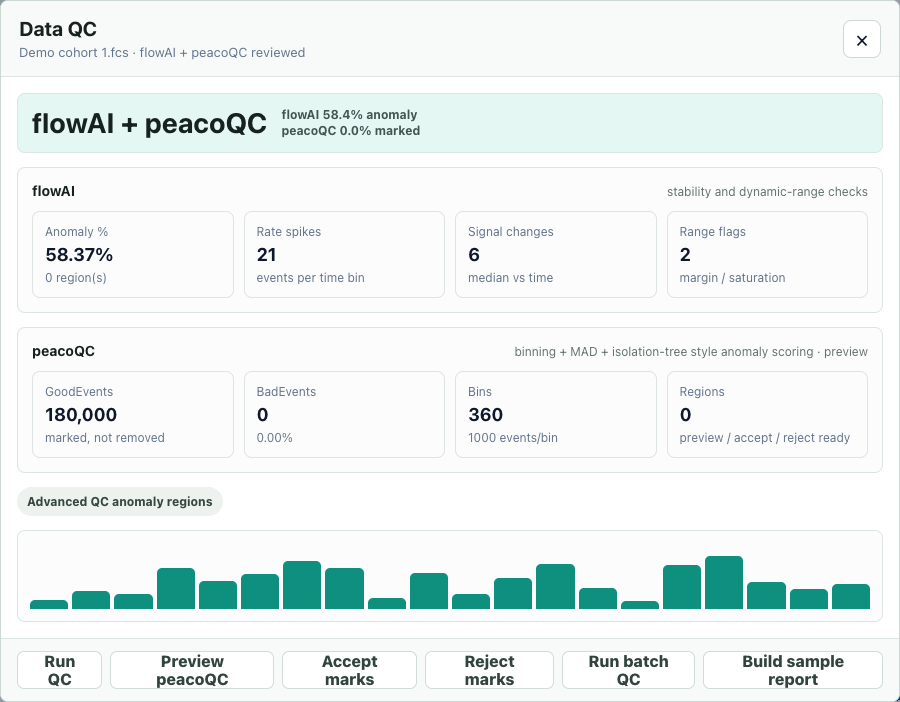
If an assay requires a cleaned dataset, use a verified event-exclusion workflow and explicitly document the input, excluded events and recalculated results. This guide does not promise a cleaned-FCS export from the mark buttons.
A reproducible software example
- Open the built-in demo in a separate experiment.
- Select Demo cohort 1.fcs and open QC → Select samples. Confirm that only this sample is checked.
- Check flowAI and peacoQC, then run QC and open its detail.
- Compare the two method percentages. Accept and reject the peacoQC marks; verify that the sample still contains 180,000 events.
The file contains synthetic immune-panel measurements and a synthetic Time channel. It is not an instrument-acquired control, a biological replicate, or a benchmark against the original packages. Its percentages demonstrate software behavior only.
| Method | Marked events | Marked fraction |
|---|---|---|
| flowAI | 105,059 | 58.37% |
| peacoQC | 0 | 0.00% |
This large difference is an observed software result, not evidence that either method is more accurate. The generated distributions and Time values are not acquisition reference standards. Investigate method-specific behavior instead of choosing the smaller percentage as “better QC.”
Download the generated example summary (JSON). The summary includes method-specific counts, implementation hashes and limitations; it contains no private sample files. New implementation versions may produce different values.
Common QC problems
No Time channel, or unclear time units
The current flowAI rate stage skips its time-based check when Time is missing or too short. Its fallback of zero flagged rate events must not be read as evidence of stable flow. Other checks can still return results. A valid Time column and acquisition timing metadata are needed to interpret a rate in physical units.
PeacoQC's event bins rely on acquisition order. Sorting or shuffling events before QC can hide or fabricate sequential patterns. An event-index trend is not a measured seconds-based rate.
A large percentage is marked
Check the actual regions, source channels, range and processing history before rejecting the file. Do not lower a threshold simply to produce a passing label. A high mark fraction calls for investigation, not an automatic explanation such as “dead cells.”
A batch keeps running without finishing samples
Check which sample and method are active. Use Pause after current or Stop when needed; hiding the dialog does not stop the run. Try that sample alone, restore its source file if requested, then use a smaller batch. Keep the browser open while the computation is in progress.
If the issue repeats, record the event count, channel count, method, browser and actual error message. Memory/worker failures and acquisition anomalies are separate issues; a software failure is not a QC failure of the specimen. Do not solve a memory error by allowing arbitrary script evaluation.
The report says QC not run
Confirm the report's included samples and selected methods. A QC result for one sample or one method does not cover other samples or methods. The launcher can reuse results for already completed methods; inspect the run scope rather than assuming that every imported file was processed.
References and next steps
Monaco et al., flowAI (2016) · Emmaneel et al., PeacoQC · flowAI package · PeacoQC package.
Product steps and limitations above were checked against FlowApp, not inferred from those packages. Continue with population definitions and report objects and results.